(en-gb) ▼
  Klick hier, um diese Seite auf Deutsch zu lesen
 Click here to read this page in English
 Cliquez ici pour lire cette page en français
 Klik hier om deze pagina in het Nederlands te lezen
46150members
688online
158119posts
30.11.2021 21:40 - edited 30.11.2021 21:43
30.11.2021 21:40 - edited 30.11.2021 21:43
Hello,
Just bought a Medion S15449 and everything works pefect except the software I use to manage settings on my external USB audio card "Hotone Ampero".
I installed latest driver from the Supplier.
Windows detects it and can actually play audio through the audio card but the software is not able to detect the connected device.
The same software on my old Windows 10 PC does detect the connected device.
I already tried with :
Is there anything I can further try?
A more technical description of the problem with screnshots here: https://www.thegearpage.net/board/index.php?threads/ampero-editor-no-device-connected.2309406/
Thanks
13.10.2022 07:01 - edited 13.10.2022 07:02
13.10.2022 07:01 - edited 13.10.2022 07:02
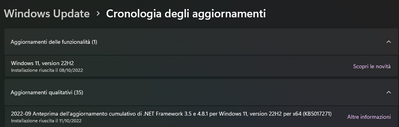
The Ampero Editor started working after this updates on Windows 11:
on 02.02.2022 09:57
on 02.02.2022 09:57
Hi @Deleted ,
sorry for that late reply but I´m interested if you´re still in need of any assistance, or if you could solve the problem.
Would be nice to have an answer on this one
Cheers
Major ToM


02.02.2022 11:29 - edited 02.02.2022 11:36
02.02.2022 11:29 - edited 02.02.2022 11:36
Hello Major_ToM,
unfortunately I have not fixed the problem yet.
The audio card software is not able to speak with the device on this laptop.
on 04.02.2022 14:10
on 04.02.2022 14:10
Hi @Deleted ,
speakling generally, If the soundcard is displayed and set up in Windows (dev manager), it should not really be the windows supply, which ist the problem.
If you´re using the USB 2.x port, you could try the USB 3.x (Type C) port which deliver more than the 500mA.
Second alternative would be to use a USB-Y Cable to ensure the ext. device has enough power.
Cheers
Major ToM
on 09.02.2022 17:29
on 09.02.2022 17:29
Thanks for the reply. Unfortunately no solution worked.
on 08.06.2022 07:22
on 09.06.2022 09:39
on 09.06.2022 09:39
I have tried everything but nothing worked. Have you got the same problem with the same Ampero and Medion model?
13.10.2022 07:01 - edited 13.10.2022 07:02